Miniature Sets That Look Full-Size: Forced Perspective for Beginners
You don’t need a warehouse or a VFX studio to put a city skyline, a mountain ridge, or a haunted mansion in your film. You need a shoebox, a hot glue gun, and one stubborn rule about where the camera sits.
I’ve built exactly two miniature sets that held up on camera, and I wrecked the first one by walking in to grab a coffee. Nobody warns you about the trade. A miniature set is fragile, it’s cramped, and it only exists for one specific camera position. Get that position right, though, and a twelve-inch model reads as a building. The method is called forced perspective, and it’s been the backbone of movie magic since before anyone said the words “visual effects.”
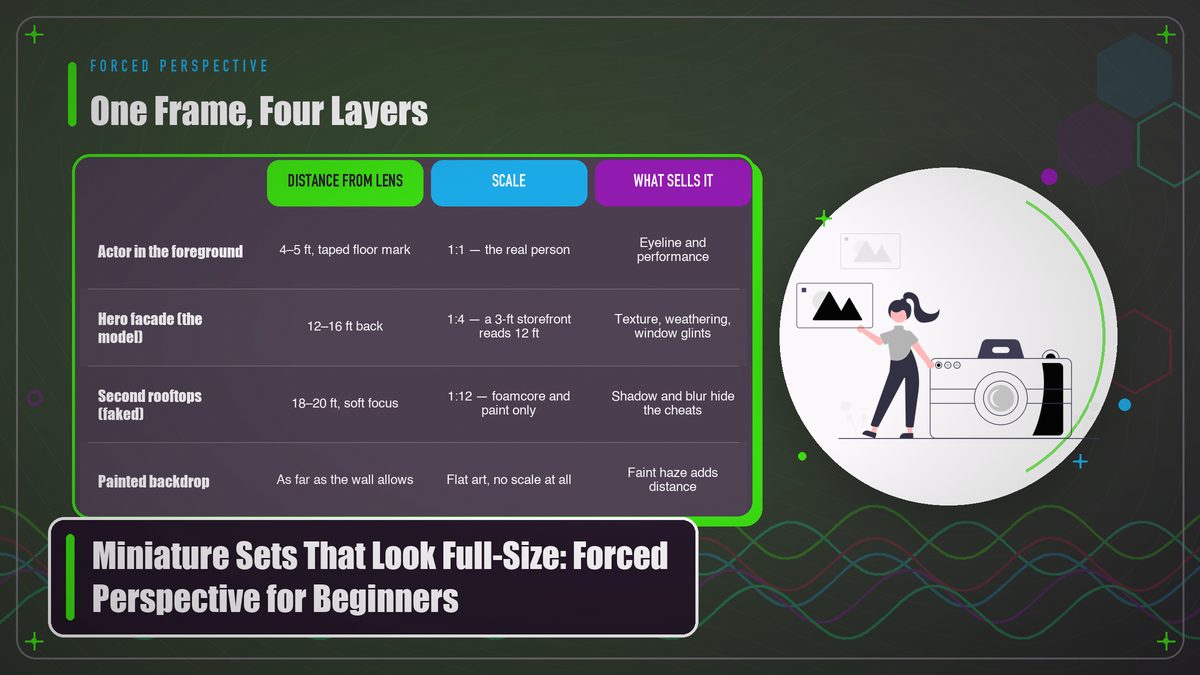
Forced perspective is simple to say. Put objects at different distances from the camera and your brain assumes the farther ones are bigger, because that’s how the world normally behaves. A model twenty feet behind an actor gets processed by the viewer’s eye as a full-size structure much farther away. Filmmakers have leaned on this quirk of perception for over a century; the long version lives on the Wikipedia page for forced perspective, which is honestly better organized than most film school notes. What matters for your weekend shoot is that the illusion collapses the moment anything moves. The camera can’t drift, the actor can’t step off their mark, and no prop can be nudged out of line. Alignment is the entire effect.
Big productions have used this at absurd scales. The Lord of the Rings built Hobbiton as a working village and then built a second, larger Hobbiton a few miles away, so hobbits and humans could share a frame without a single composite. The props team behind that work, Weta Workshop, still displays those techniques in its behind-the-scenes tours. You won’t be building a second village. You’ll build one corner of one street, and the principles carry over fine.
What Your Camera Sees (and Why It Believes It)
The one rule: the camera position is sacred. Everything else is negotiable.
Zoom with your feet before you zoom with the lens. A long focal length, something in the 50 to 85mm range on a full-frame camera, compresses the apparent distance between foreground and background, and that compression is exactly what squeezes a twelve-inch model into place beside a six-foot actor without the viewer ever sensing the gap between them. Wide lenses do the opposite. They stretch depth apart, and the gap between a person and a model turns obvious. Phone shooters aren’t exempt either. Set yours to 2x or 3x zoom so it engages the telephoto lens, and pin the thing on a tripod. Handheld is the enemy here. Even breathing on the rig can be enough to shear the layers apart.
Depth of field is your other lever. A wide-open aperture gives you a shallow band of focus, and that band hides a multitude of sins: imperfect paint, visible card edges, the texture of corrugated cardboard. Stop down too far and every flaw in your model turns razor sharp. Around f/2.8 to f/4 is a forgiving starting point on most cameras, though you’ll want to test with your specific glass. Dim the set while you’re at it. Shadow-heavy lighting doesn’t just look moody, it lets you bury half your model in shadow, and shadow is free detail.
Perspective errors grow with distance.
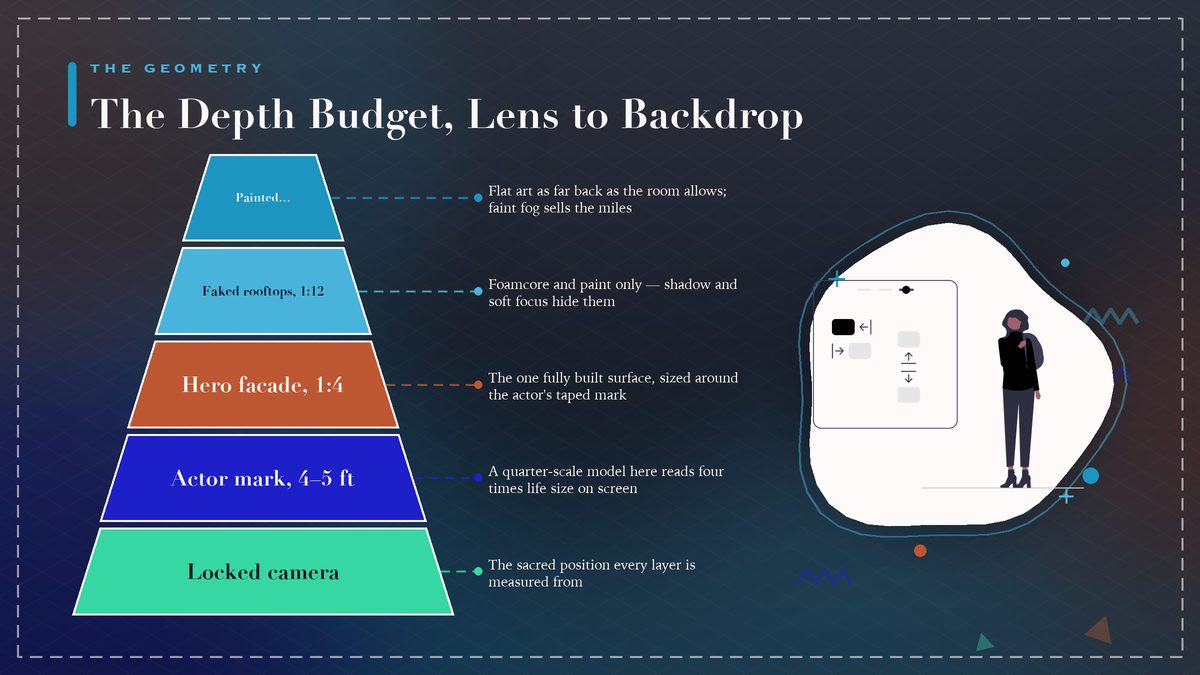
For every foot of separation between your layers, the scale ratio between them can grow roughly in proportion, and small misalignments grow right along with it. I aim to keep my layers within about fifteen feet of total depth for indoor setups, mostly because that’s what a living room allows. Your mileage will vary with your space.
Planning the Shot From the Camera Position
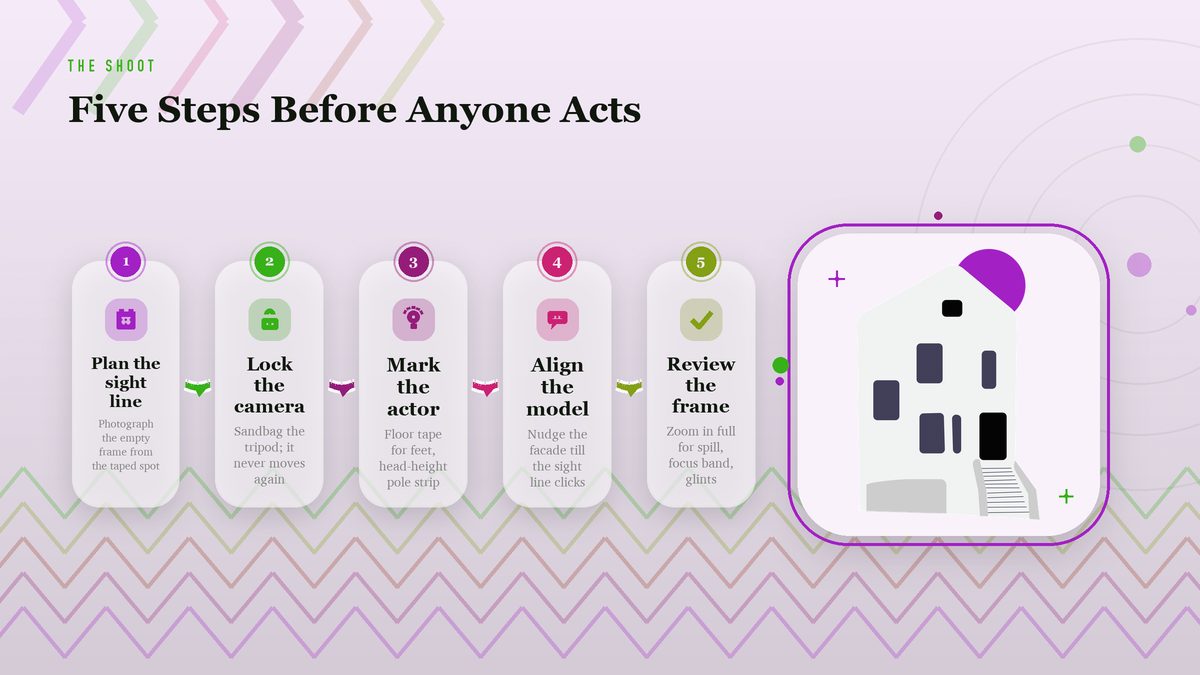
Everything starts with the viewfinder, which feels backwards if you’re used to sets you can walk around. You don’t design a miniature and then hunt for a camera angle. You plant the camera, frame the shot you want, and build only what that frame requires. Wedge a phone or a director’s viewfinder app where the real camera will sit and photograph the empty space. That photo becomes your blueprint.
Trace your sight lines onto the photo. Run a line from the lens to each corner of the frame and you’ll see exactly which planes of the model will be visible, which you can fake with paint, and which you can skip entirely because the camera will never know they existed. Half the rooftops in your shot can be empty foamcore painted to read as slate, because the audience never looks up unless you give them a reason. The Academy Museum in Los Angeles runs rotating exhibits on exactly this kind of economical illusion-making in film history, and its collection notes are a nice reminder that frugality is a tradition in effects work, not a compromise.
Scale the model to the frame rather than to itself. If your actor stands four feet from the lens and the model sits sixteen feet back, the model needs to be roughly a quarter of the “real” size of the thing it represents, so a twelve-foot-tall storefront becomes a three-foot-tall facade. Roughly is doing some work in that sentence. In practice you eyeball the frame and nudge the model an inch at a time until it clicks, though some shooters prefer to compute everything properly with a viewfinder app. More power to them.
Block your actor’s position before the model arrives. Tape a mark on the floor for their feet and a second strip at head height on a stand-in pole, so you know exactly how much vertical frame the person occupies, then size the model around that mark. I rebuilt a cathedral facade at 2 a.m. once because I’d sized it to the actor’s likely position instead of their taped position. Those are different buildings.
Building the Model: Cheap Materials, Serious Craft
Start with foamcore, cardstock, and balsa. Hobby shops sell all three, and a twenty-dollar run covers most of a street facade, which is roughly what I spent on the corner store that fooled three separate viewers in my test footage. For texture, raid the recycling bin: egg cartons make convincing rooftop vents, plastic mesh from produce bags reads as window security screens, and sanded drywall spackle turns a flat wall into weathered stucco for about four dollars a tub. The camera forgives almost anything at distance. Straight, glossy edges are the exception. Real buildings accumulate grime.
Age everything, then age it again. A dry-brush pass of darker paint along the base of walls, a few water-stain streaks running down from window sills, some matte black inside the window recesses. That adds more realism than any amount of fine detail work. Windows are where miniatures die, honestly. On a real building, windows reflect sky and interior light, so a flat painted window reads fake instantly. Cut the openings out and back them with dark acetate, or angle strips of foil inside so they catch a glint. One flicker of reflected light sells a window better than forty minutes of painted mullions.
Paint for the light you’ll shoot in rather than the light you have in your workshop. Warm tungsten and cool daylight change how colors read on camera, and a miniature has no atmosphere to soften wrong choices. A slightly desaturated palette almost always looks better than a vivid one at small scale, and there’s a reason: saturated reds and greens belong on toys in our visual vocabulary, so dial them back about twenty percent and the same model suddenly reads as architecture.
Keep the back of the model ugly. Your effort goes only toward the surfaces the lens sees, and a facade that looks finished from the front can be bare foam and tape behind it. Effects shops have a saying that applies here, roughly “it only has to work from one angle.” It sounds cynical until you realize that constraint is exactly what makes weekend filmmaking possible.
Lighting the Illusion
Match the direction first and the quality second. If your main light on the actor comes from frame left at a steep angle, your model needs a hard source raking across it from the same direction, which usually means a small LED panel on a stand or even a focused desk lamp. Miniatures tolerate harsh light poorly, because small shadows look enormous relative to a model. So feather the beam or diffuse it through baking parchment. The mismatch you’re avoiding is subtle but fatal. Viewers can’t always name it, yet they’ll feel that the building is lit by a different sun than the person.
Atmosphere helps everything. A faint haze between the layers, the kind you get from a cheap fogger or even a damp cloth waved through the light, gives the camera real air to look through, and air is what full-size distance looks like. The technical term among shooters is aerial perspective, and the Wikipedia article on miniature effects covers how the classic studios abused smoke machines for exactly this reason. Keep the haze faint, though. Thick fog turns your careful alignment into soup, which I learned the hard way while testing recipes for this site’s fog article.
A model lit by the same sun as your actor is a building. A model lit by anything else is a toy.
Flag the spill light. The most common lighting blunder in beginner miniatures is a stray beam hitting the model’s top or side edge, which outlines it against the background like a cardboard cutout at a county fair. Black wrap or even tinfoil shaped into a snoot around your model lamp keeps the light exactly where you staged it. Check the frame at full zoom before rolling, because edge spill that’s invisible to your eye will glow on a monitor.
Camera Settings That Hide the Seams
Lock the camera like it owes you money. A fluid-head tripod is the minimum, and I’d argue for sandbags or taped-down legs if anyone will walk near the rig. After the model is aligned, every adjustment must come from nudging the model, never the camera. If your camera has focus peaking or a punched-in focus assist, turn both on; you’ll be focusing on the junction between layers, which is the one spot in the frame that must stay crisp.
Shoot the widest clean frame your lens allows, then punch in during editing if you need a tighter shot. Resizing the frame in post preserves the alignment you fought for. But repositioning the camera throws it away. Keep the shutter at double your frame rate, the standard 180-degree rule, unless you have a reason. A fast shutter introduces judder, and judder makes models look like models because it kills the motion blur our eyes associate with scale. Motion blur is, weirdly, one of the biggest tells in miniature photography.
Consider a slight tilt-shift cheat. The tilt-shift look, normally used to make real cities resemble toys, works in reverse for us: a hint of selective blur along the top and bottom of the frame mimics macro photography and nudges the viewer’s brain toward “small and close,” then the forced perspective pushes back toward “large and far.” The two impressions fight, and the result reads as something convincingly full-size. Some editors fake it with a graduated blur filter. Blender users can do it optically with real lens shift, which the Blender manual documents under camera settings if you want the principled version.
Four Mistakes That Break the Illusion
Most failed miniatures fail in predictable ways. Learning the failure modes is faster than learning every technique at once, so here are the four I see most often in beginner footage, including, on one memorable occasion, my own.
| Mistake | What it looks like | The fix |
|---|---|---|
| Wide lens close to the model | Visible gap between layers, model looks doll-sized | Move back, zoom in, compress the depth |
| Camera touched mid-take | Layers visibly shear apart, ruined alignment | Tape the tripod, adjust the model instead |
| Flat, even lighting | Model reads as paper, no depth cues | Hard raking light, deep shadows, faint haze |
| Wrong scale details | Doors and windows betray the miniature | Size every detail to the figure first |
The detail-scale problem deserves a closer look, because it’s the sneakiest of the four. Beginners scale the building and forget the world around it: doors, windows, trash cans, telephone poles. A door an inch too narrow for the implied human figure is the fastest way to shrink your building on screen. Hold a cutout of your actor at the correct miniature height against every architectural element as you build. Which is to say, don’t trust your ruler where a silhouette tells the truth.

Focus errors round out the list. Depth of field so shallow that the model’s top floor blurs while its ground floor stays sharp tips viewers off to the scale mismatch; depth so deep that every dust mote on the paint turns crisp tips them off to the model. There’s a band between those extremes, maybe a foot or two deep in most setups, and finding it means creeping the aperture a third of a stop at a time while watching a magnified frame. Tedious work, and worth it.
Your First Weekend Build: A Street Corner
Keep the ambition small and finish the thing. A street corner with one hero facade exercises every skill in this article without eating a month of evenings: alignment, lighting, texture, scale. Find a wall in your house with fifteen feet or so of clear depth, mark your camera position, and frame a shot with an actor standing four to five feet from the lens. That frame decides the size of everything you build.
- Morning, day one. Photograph the empty frame from the taped camera position and trace the visible planes. Cut a paper template of your facade and tape it in place to check scale before any glue dries.
- Afternoon, day one. Build the facade in foamcore with two or three window cutouts, back them with dark acetate, and run a dry-brush weathering pass. Ugly is fine on the back. Ugly is expected on the back.
- Morning, day two. Set your actor’s floor mark, align the model along the sight line with a wedge of cardboard under one corner if the floor’s uneven, then lock everything and shoot a test frame.
- Afternoon, day two. Light the actor and the facade from the same direction, add the faintest haze, review at full zoom for edge spill and the focus band, then roll your takes with the camera untouched.
You’ll know within the first test frame whether the illusion holds. When it does, the feeling is hard to describe, like a magic trick you performed on your own living room. When it doesn’t, the frame tells you exactly which section of this article to reread, because each failure has a signature.
That’s the whole craft, really. One camera position, one sight line, one model built only for that line of sight, and enough discipline to keep your hands off the tripod. The studios did it with cathedrals and castles; you can do it with foamcore and a free weekend, and the camera can’t tell the difference.
Related reading on this site: DIY Fog and Haze: Making Atmosphere Without a $500 Fog Machine. External sources: Wikipedia on forced perspective and miniature effects, Weta Workshop, the Academy Museum, and the Blender camera documentation.