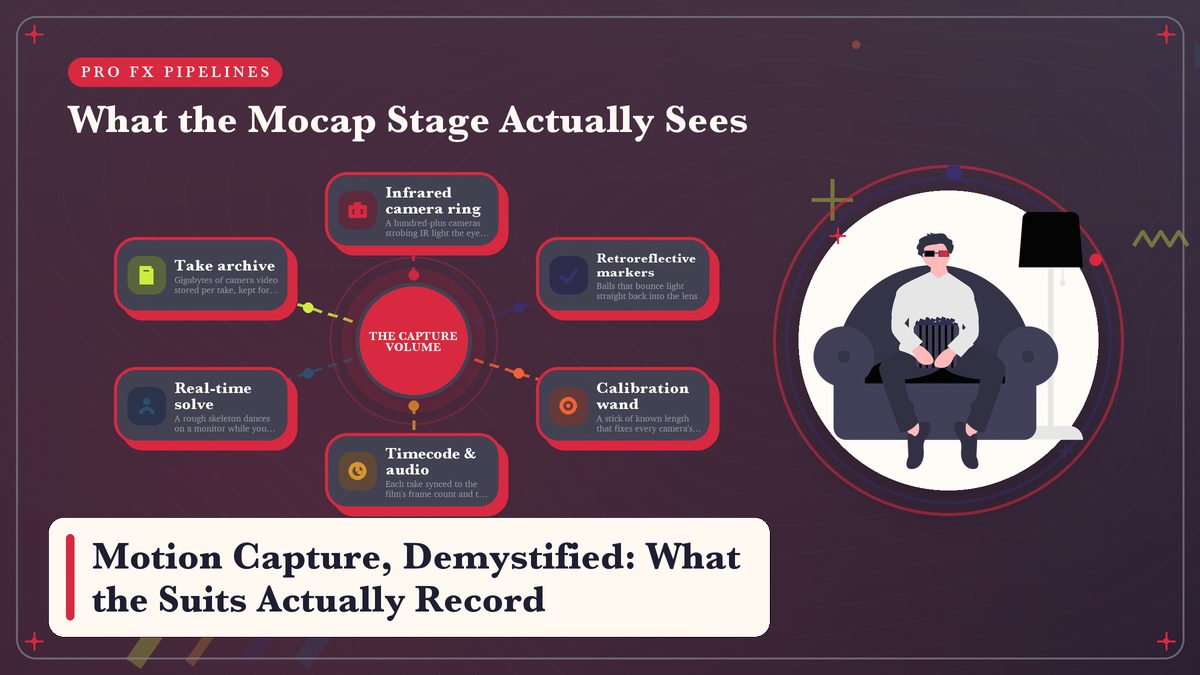
Actors in dotted spandex have become one of the most recognizable images in modern filmmaking, and almost everything the public believes about those suits is a little off. The suit doesn’t record a performance. It records positions in space, thousands of times a second, and everything audiences call the performance gets rebuilt afterward by other people.
Watch a behind-the-scenes featurette from the last twenty years and, somewhere past the middle, you’ll find the shot. An actor in a grey bodysuit studded with white ping-pong balls lunges at nothing in a room ringed with cameras, while a nearby monitor shows a rough cartoon ape hitting the same lunge. The natural assumption is that the suit somehow records the acting and passes it to the creature, and that assumption is wrong in an interesting way. Wrong, but interesting. What the system actually captures is far dumber than the acting, and to my mind far more fascinating. Reflective dots, a few dozen of them, changing position, sampled over and over. Every bit of meaning audiences read into the finished character gets inferred from those dots by software, nudged around by technicians, and then partly redrawn by animators. See where the pipeline splits, and you stop asking why the CG character moves almost but not quite like the actor. You start asking a better question, which is how much of what you watched was ever the actor at all.
What the Suit Actually Records
Strip the technology down and motion capture is a measurement problem wearing a costume. The system needs reference points on the performer whose positions it can sample over time, and there are two broad ways to get them. An optical system uses retroreflective markers, little balls that bounce light straight back toward its source; an inertial system hides tiny rotation-measuring sensors in the fabric instead. Neither one records muscle, intention, or expression in any direct sense. Both record geometry. That’s the entire job. This point sat here at frame one, here at frame two, usually somewhere between 120 and 240 times a second, and nothing else survives the session.
That distinction explains more than you’d expect, because it’s the source of the slightly floaty look that bad mocap carries onto the screen. A person watching a dancer reads weight and effort and the small shift of a hip that signals hesitation; a camera watching a marker learns only that a point in space moved twelve centimeters in one twenty-fourth of a second. That’s all it knows. Everything an audience calls meaning has to survive a translation from points to skeleton to character, and at each stop in that chain something gets lost, or invented, or replaced with a guess. (Surveyors run the same math and call it resection, a word I mention only because it’s fun to say.)
Suits record where points in space were. Meaning arrives later, added by software and by animators.
Inside the Volume, the Camera Ring
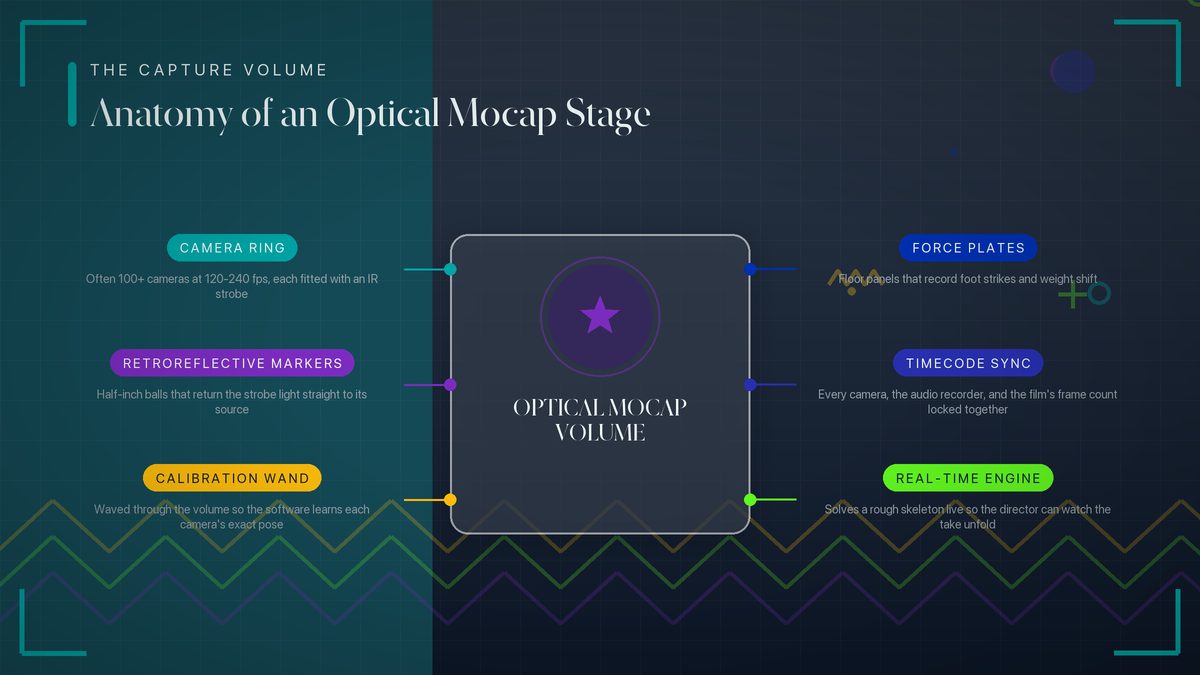
The classic image is the optical stage, and it’s worth a slow walkthrough, because every other mocap technology is basically an answer to its main inconvenience, which is that you have to go to it. A professional optical volume is a room ringed with cameras, anywhere from a few dozen to well over a hundred, bolted to trusses and aimed inward. Nothing fancy so far. Each camera carries an infrared light source plus a filter that blocks nearly all visible light, so the marker-covered performer shows up as bright dots crawling through a black frame. Retroreflection does the heavy lifting, since the markers send each strobe’s light straight back to its own camera. Tracking bright dots against darkness turns out to be about the most forgiving computer-vision problem there is.
Before anyone performs, the volume gets calibrated. A technician walks the space waving a wand whose marker spacing is known to the millimeter, and the software uses those sightings to work out where every camera sits and which way it points; only then does the math get trusted. Trust is earned. Capture rates commonly run from 120 up to 240 frames per second or higher, because a sword fight or a fall goes ambiguous at ordinary film speed, and ambiguity is the enemy of a clean solve.
One more piece of hardware hides in the floor of serious stages. Force plates measure the actual impact and weight distribution of footsteps, and animators lean on that data hard. Cameras alone can say where a foot was but never how hard it came down. That force is the difference between a saunter and a stomp. Small sensor, big consequences. Vicon, one of the outfits building these systems, publishes camera specs and software details at vicon.com, and ten minutes there shows you how engineered the whole room really is.
From a Cloud of Dots to a Skeleton
After the take, the raw material is gloriously abstract. Each camera has recorded bright dots drifting through darkness, and the first processing stage, tracking, is the software finding every dot in every camera image and following it frame to frame. Sessions most often fail here, because markers get occluded constantly. Occlusion is the enemy. Hugs, crossed arms, a body rolling across the ground — any of them can drop a dot from forty cameras to six, or to none.
Solving comes next, and it leans entirely on the calibration. The calibration pays off here. The system knows each camera’s position exactly, so it can triangulate: a dot appearing at a certain pixel in camera 12 and another pixel in camera 47 must live where those two sight lines cross. Run the math across the whole ring and you get each marker’s position in three dimensions, frame by frame, and a good solve looks like a constellation having a small fit, fifty-odd named points jittering through space.
Even that constellation isn’t a skeleton yet. Labeling matches each point to a body part using a template captured during a slow calibration pose at the start of the day, and once every dot has a name the system fits an idealized skeleton of joints and bones to the cloud. Bones from dots, more or less. This is where the pipeline forks, because the human skeleton is almost never the skeleton the audience will end up watching.
Retargeting, or Why the Character Never Moves Quite Like You
Say the performer stands five foot eight with ordinary proportions and the character is a seven-foot ogre with arms like canoe paddles. The data says where the human’s wrist traveled; it says almost nothing about where the ogre’s wrist should go, because the shoulder sits somewhere else, the forearm runs a different length, and the mass being swung isn’t even comparable. Different bodies, different physics. Retargeting translates the human motion onto that other body and keeps it believable, and it’s a genuinely hard problem with no single right answer.
The usual approach transfers rotations rather than positions. The performer’s elbow bent so many degrees over so many frames, so the character’s elbow bends by the same amount. The software then compensates for the different bone lengths, so feet land where feet should land instead of skating through the floor or hovering above it. Even done well, the result belongs to the character’s proportions as much as to the performer. A captured take on a stylized figure reads as that figure doing a motion, never as an actor wearing a costume. Gollum worked this way. So did the apes. Animators kept enough of Andy Serkis’s retargeted choices to preserve his decisions, then replaced whatever his human anatomy couldn’t express, and the split shows if you know to look for it.
The Cleanup Nobody Talks About
Featurettes skip this part. A solved, retargeted take is almost never ready to use. The data arrives jittery because triangulation noise makes every joint tremble a little, and fingers are the worst of it. They’re small, they cluster together, and their markers occlude one another constantly, so hand data often shows up unusable and gets animated by hand anyway. Which is where the cleanup artists come in.
Eye lines never make it into body capture either, so every glance at a specific thing was a decision made later. Even the spine, which ought to be easy, needs smoothing passes or the character reads nervous when the performer felt calm, which is the kind of bug nobody budgets for. Whole teams of cleanup artists then work through takes frame by frame, killing jitter, pinning contacts, and nudging poses until the motion matches what the director remembers rather than what the cameras measured. That invisible labor is why the public thinks mocap is magic.
In truth it’s the same animation craft described in our CGI pipeline walkthrough, just applied on top of a head start. The suit buys animators a first draft, sometimes a very good one, the draft still needs an editor.
Optical, Inertial, or Just a Phone
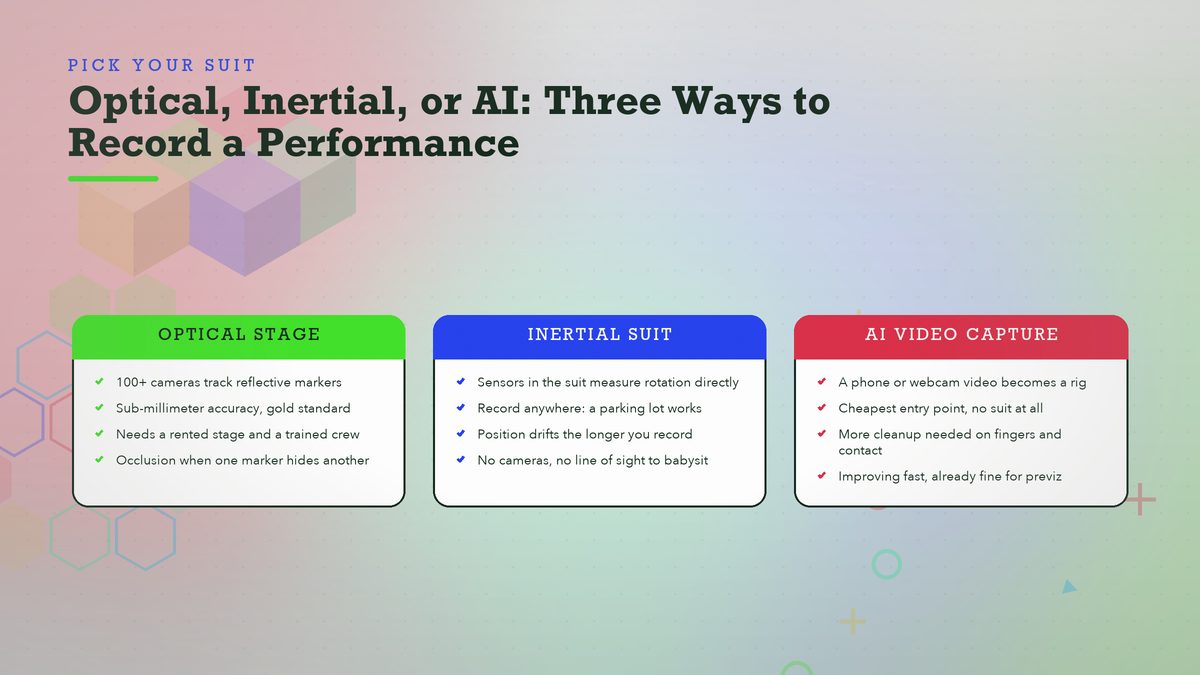
The optical stage is the prestige option, but it isn’t the only game. Inertial suits flip the idea: instead of cameras watching markers from outside, the costume itself carries the sensors, dozens of little clusters that each report how their section of the body is rotating. Nothing can occlude because there’s nothing to see. No volume needs renting. Performers have recorded on location in forests, on boats, and in the back of moving cars, which I think is rather the point. But drift is the price. With nothing external anchoring the suit to absolute space, small errors accumulate, and a long take can finish with the character standing somewhere the performer never stood. Xsens, whose suits turn up constantly on television productions, now sits under Movella, and the company lays out the inertial approach at movella.com.
Markerless capture is the newest branch, and it skips the costume entirely. It feeds an ordinary video, sometimes shot on a phone, to software that estimates a skeleton straight from the images using pose-estimation models. No suit, no markers, no stage, and the results used to be good for little beyond rough previsualization. The models have improved fast, though, and for hobbyists this is now the cheapest door into the whole field. Setup takes minutes.
| Approach | What it records | Best for | Main weakness |
|---|---|---|---|
| Optical stage | Marker positions from a camera ring | Feature films, highest fidelity | Cost, and occlusion when markers hide |
| Inertial suit | Rotation from body-worn sensors | On-location TV and games | Drift over long takes |
| Markerless / AI | Skeleton estimated from video | Hobbyists, previz, quick tests | Noisier fingers and contacts |
Where You’ve Seen Mocap Without Knowing It
Digital creatures get the attention, but the quiet conquests are everywhere. Modern games are saturated with captured movement, since walk cycles, combat strings, and victory dances in big titles almost all started life in a volume. Hand-animating roughly a hundred hours of human motion is nobody’s idea of a good decade. Volume first, polish later. Digital doubles, those perfect replicas used for stunts insurance won’t cover, borrow capture for movement and cleanup teams to keep the replica inside the actor’s recognizable style. Even productions that swear by practical effects lean on capture for the shots a real body can’t survive, the same way a crew wires up a rig and paints out the evidence, as our wire removal tutorial covers.
Faces play by different rules. A face runs on dozens of small muscles, far too many for body stickers to track, so productions moved the cameras onto the performer. Modern head-mounted rigs carry one or more tiny cameras aimed at the face, recording every wrinkle and lip curl, sometimes with marker dots pasted on, sometimes with nothing but footage and software. Pair that with body capture and you get the full performance-capture package, which is how a single actor can now carry a digital character through close-ups body data alone could never deliver.
What Happens After the Take
Laying the journey out in order is the article in miniature, because the count of steps between “actor lunges” and “creature lunges” is the whole story. Recording is step one.
The rest is where the weeks and the money go.
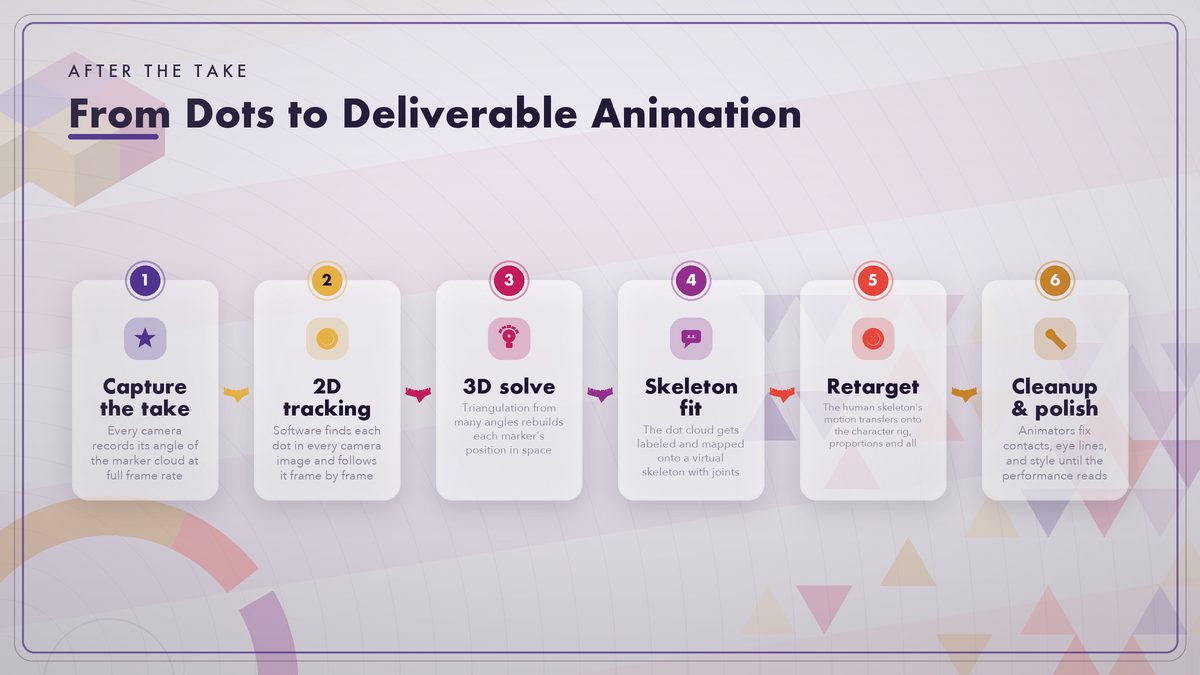
Notice what this pipeline shares with the rest of effects work: each stage hands off to a specialist, and every specialist can send the shot backward. A bad solve forces a retrack; a retarget that doesn’t fit the character forces a different mapping; a director’s note forces a new take. Our storyboard-to-final-frame pipeline article covers that relay race from the CGI side, and mocap slots in as the animation department’s raw-material supplier.
Trying It Yourself on a Budget
You don’t need a soundstage anymore, which is the good news for hobbyists. Your living room works. Rokoko sells inertial suits and gloves at prices a dedicated enthusiast can actually reach, and rokoko.com runs a steady stream of tutorials from people capturing in living rooms. If even a suit is too much, markerless tools now pull a skeleton from video shot on hardware you already own, and the quality has probably passed the convincing-test threshold by now.
From there the free toolchain takes over. Blender imports common mocap formats, and its manual’s animation and armature sections at docs.blender.org cover the retargeting concepts you’ll need. Unreal Engine ships serious retargeting tools too, and Epic’s documentation on IK Rig retargeting is the friendliest explanation of the proportion problem you’ll find anywhere. For data to practice on without performing yourself, there’s the Carnegie Mellon motion capture database at mocap.cs.cmu.edu. It has hosted free captured takes for over two decades, and researchers and indie developers have learned on it since the early 2000s. Our roundup of free VFX software fills in the rest of the toolchain, and our first Blender composite guide puts your captured character inside a real shot.
The Performance Is Made Twice
So what does the suit actually record? Positions, nothing more. Bright dots in a dark room, or sensor readings inside a costume, or joints estimated from a video, sampled hundreds of times a second. I said fifty-odd markers earlier; a feature-film suit often carries more, especially once props and face markers join the set.
The performance gets made twice, once by the actor in the volume and once by the chain of people turning dots into a character worth watching, and neither version works without the other. That’s why strong mocap performances still carry big animation credits, and why the craft survives even as recording gets easier every year. Next time a dotted suit turns up in a featurette, you’ll know which half of the magic you’re looking at, and which names to hunt for in the credit roll.
Sources and further reading: the Vicon product documentation, Movella (Xsens), Rokoko, the Blender reference manual, Epic’s Unreal Engine retargeting documentation, and the Carnegie Mellon motion capture database. We update articles when tools or workflows change; spotted a broken link or an outdated detail? Mention it in the comments.