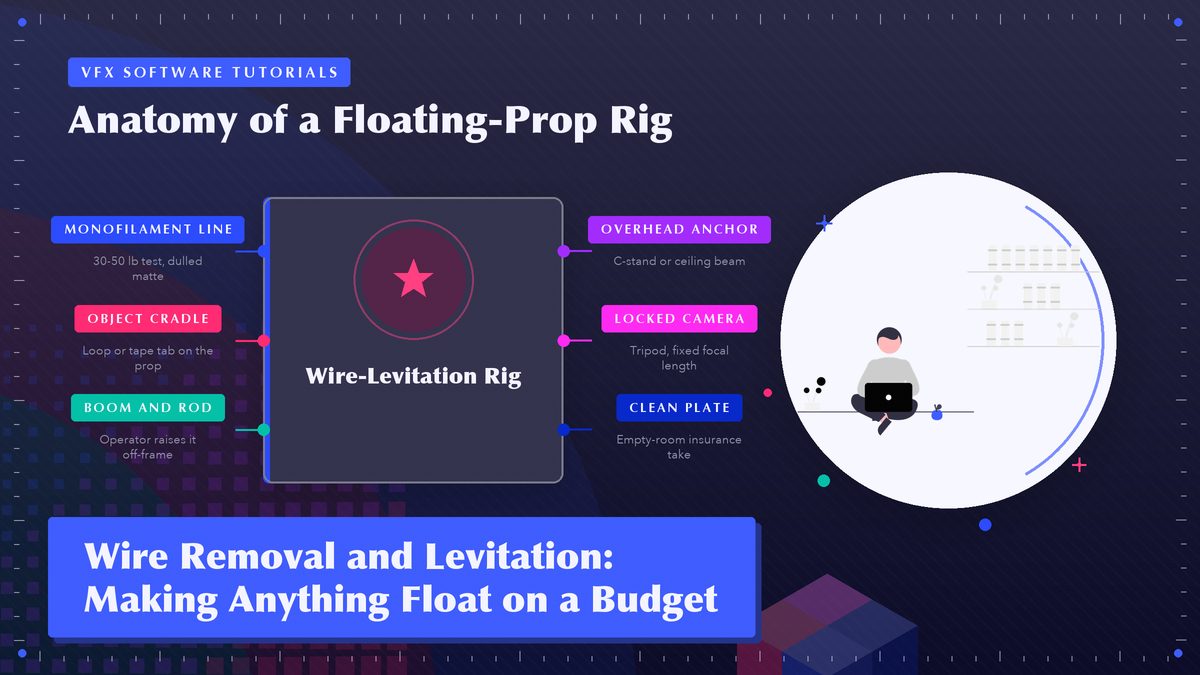
The reason a coffee mug can drift across a kitchen in a $200 short film is rarely fancy software. It’s a piece of fishing line, one clean plate, and an hour of patient patching — and every step is within reach of a weekend shooter.
Every levitation shot you’ve ever loved, from wuxia sword fights to a haunted doll sliding off a shelf, started with one boring question. How do we hold the thing up? Big productions answer with stunt rigs that cost more than a house. You don’t need that. For the kind of shot a hobbyist actually shoots (a prop floating, a photo frame tipping itself off a wall, an actor drifting two inches off a bed), the whole trick fits in a garage, and the part that looks expensive happens in software you may already own.
I’ve cleaned wires out of more home-brew shots than I can count, and the pattern never changes. Rig it safe. Shoot it twice. Patch it slow.
Why Wires Still Beat Pure CG for Small Stuff
It’s tempting to skip the hardware and just animate the mug in Blender. Sometimes that’s the right call, and we’ll get to when. But a practical object on a wire brings free physics with it. Real shadows. Real reflections in the window behind it. Real wobble when the ceiling fan spins. A CG object gives you none of that unless you work for it, and that work is the hard half of CG.
For a lightweight prop gliding three feet across a table, a $12 spool of monofilament beats a CG double on both cost and realism. When the object has to shatter, morph, or bend light in ways glass never would, build it digital instead and skip the tackle shop entirely. The catch, of course, is that the line sits right there in your footage, catching light like a guitar string. That’s the actual job. The floating is a hardware problem you solve in an afternoon, while the disappearing is a software problem you solve one frame at a time.
Neither approach is cheating. Directors with nine-figure budgets mix practical wires and CG in the same shot all the time, and nobody in the audience can tell where one ends and the other starts, which is rather the point.
Nobody has ever watched a shot and praised the wire removal. They only notice when it’s missing.
The Rigging: Four Ways to Hang a Thing
Best option depends on weight, distance, and how much of the room the camera sees.
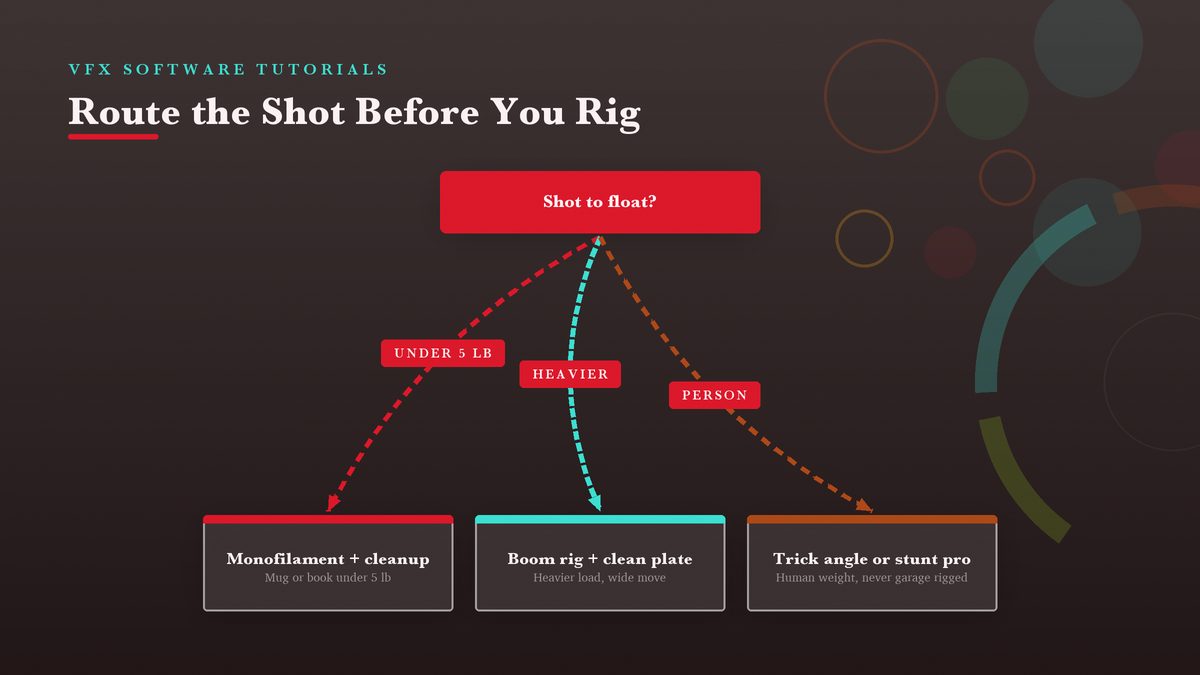
Most props under about five pounds can hang from monofilament fishing line, the kind sold at any tackle shop. I’d run 30–50 lb test for coffee mugs and hardcover books, and go lighter, 8–12 lb, for paper and fabric, because thinner line is harder for the camera to find. Tie a loose loop around the object or tape a small tab to it, run the line up out of frame to a boom pole, a clamp on a shelf, or a nail in a ceiling beam, and you’ve built ninety percent of the rigs in this article.
For heavier loads or anything you need to move on cue, step up to a boom and rod. A painter’s pole or length of PVC pipe with the line threaded through the tip lets an operator standing off camera raise and lower the load without a hand entering the shot. Old-school riggers also lean the whole assembly away from camera at a deliberate angle, since a line seen edge-on nearly vanishes while a line crossing the frame face-on shows up as a bright scratch across your plate.
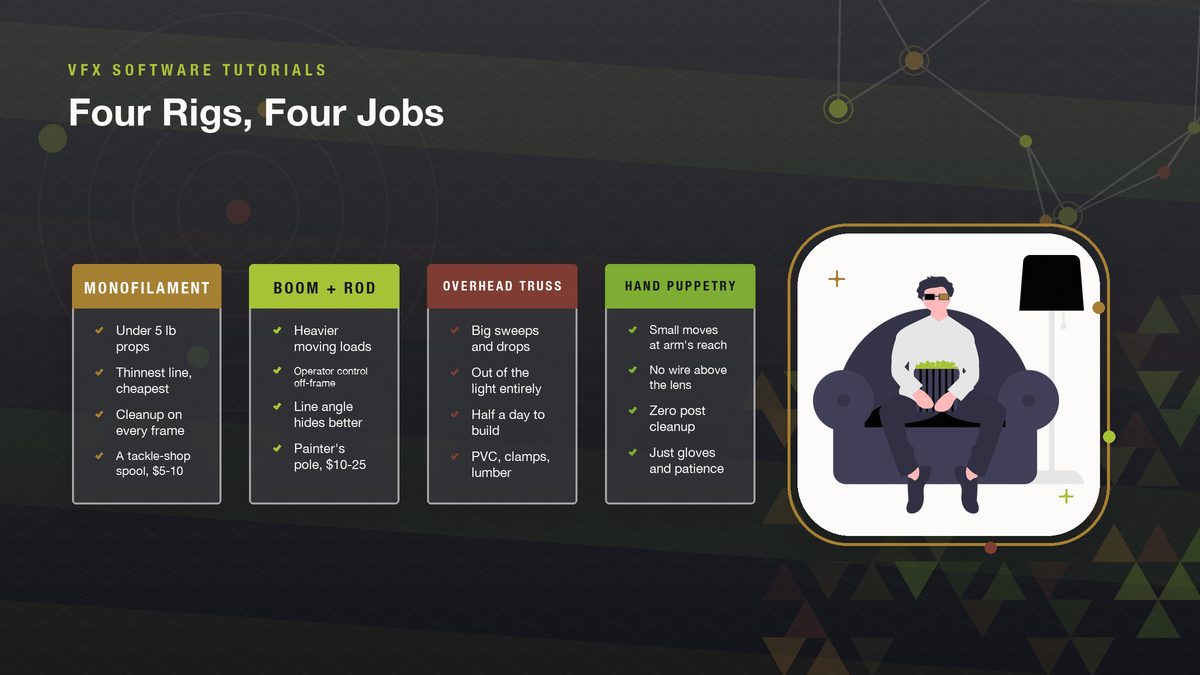
One warning from experience. Never tie a live load to a hot light, a curtain rod, or anything a person might bump mid-take. A mug swinging into a lens is a funny story; the same mug swinging into a face isn’t. Gaffer’s tape and a sandbagged C-stand, or a stepladder as an anchor if you must, and keep the load path vertical where nobody stands.
Geometry Beats Software
Where you put the camera relative to the line decides how much of the second half of this article you’ll need. Keep the line between camera and background at a sharp angle rather than parallel to the sensor, and it foreshortens down to a near-invisible thread. But let it run flat across the frame and you’ll be painting it out of every frame at full length.
Distance helps twice. Move the prop away from busy backgrounds, because a plain wall beats a bookshelf full of spines and gives your cleanup tool clean texture to borrow. Also give the wire a few feet of travel rather than pulling it drum-tight; a taut line shimmers, and shimmer is what the eye catches. Aperture helps too, honestly. Shoot a stop or two wider than instinct suggests and the depth of field throws the line softly out of focus, so the camera does half the hiding before you ever open an editor.
Shoot a test frame on your phone from the exact camera position and zoom in. If you can find the line at 200% without squinting, so can your audience, so re-rig before the real take. This thirty-second check has saved me entire weekends, no exaggeration.
Shooting Day: The Two Plates You Need
Wire removal goes from painful to routine the moment you shoot a clean plate, meaning the identical frame with the same camera, the same lens, the same lighting, and nothing moving in it. Lock the camera on a tripod (no handheld, no drift) and roll your performance take with the rig in place. Then everyone freezes, the prop and rig leave the set, and you roll fifteen seconds, maybe twenty, of empty room. That empty take is your patch source on every frame where the line crosses something complicated, and it’s your insurance when the object throws a shadow on the wall behind it.
- Lock everything. Tripod, focal length, focus, white balance, all of it frozen. A millimeter of drift between plates and every patch slides off its mark.
- Roll long on the clean plate, because light wanders over a shoot and you’ll want options.
- Photograph the setup. A wide still of where the line runs reminds you which frames hide it behind the prop and which leave it exposed.
- Slate your takes, calling the hero and the plate out loud, on camera. Future you, working at 1 a.m., will be grateful, and you’ll know why.
Do one full dry run with the rig loaded before you roll the hero take, and watch the playback for line shimmer and shadow jumps. Fixing either means moving a light or re-anchoring the line, a five-minute job on set and a five-hour job in post. Your future self, the one scrubbing frames at midnight, benefits from the extra ten minutes.
The Cleanup Workflow
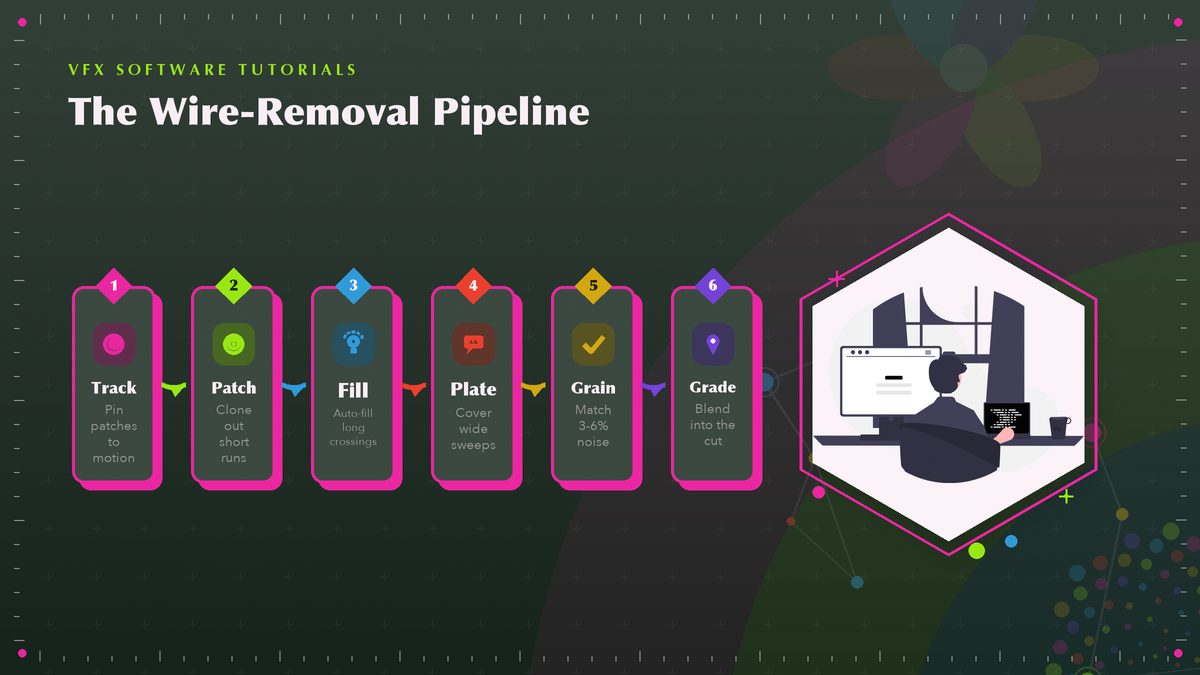
Every compositor ships the same core tools, and the differences are mostly interface. The pattern below works in After Effects, Fusion, Natron, or Blender’s compositor with only the button names changing.
Track the shot first. Before you touch a wire, run a tracker on a high-contrast corner of the background and pin your patch layers to that track. A wire crossing a static corner is a twenty-frame job, maybe less. A wire you try to paint freehand over a slow camera push is a nightmare, because the repair drifts while the line stays put.
Patch short crossings with a clone tool. The Clone Stamp tool in After Effects works like its Photoshop ancestor, where you sample clean texture from one area, stamp it over the line, advance a frame, and repeat. Keep the brush soft and match the stroke direction to the surrounding texture. Work at 200% zoom so you can see the single-pixel halo that gives away sloppy work.
Let the computer eat the long crossings. For a line held against a wall across a hundred frames, Content-Aware Fill for video (on the After Effects production builds) can generate the whole patch from surrounding frames. It isn’t magic, and it smears on repeating patterns like brick or bookshelves, but on plaster, sky, and plain fabric it saves hours. Run it twice when the first pass looks watery; the second usually lands cleaner. Generate a reference frame, fill from it, then hand-fix the first and last five frames where the algorithm tends to wobble.
Borrow the clean plate for big moves. When the floating prop sweeps across a wide stretch of background, you’ll want your plate back. Take the matching region from your clean plate, align it with the track, mask it over the line’s path, and let the locked tripod pay you back.
Finish with grain and grade. A patched region is always a touch too clean, and too-clean reads as fake faster than any leftover line pixel. Add monochromatic grain at roughly the footage’s native level (usually 3–6% in your compositor), then run the shot through the same grade as everything around it. The repair should be invisible, not impressive.
Tracking and Patching in Free Software
You don’t need a subscription for any of this. Blender ships a full camera tracker and a node-based compositor for zero dollars, and the movie clip editor section of the Blender manual walks through markers and camera solving, then feeding that motion into the compositor, which is exactly the pipeline that keeps a patch glued to a drifting shot. If you worked through our first Blender composite tutorial, wire cleanup is the same tracking step plus a clone node in place of a render layer. Budget an evening of practice, in my experience.
DaVinci Resolve’s Fusion page covers the cloning side with its Paint node, and Blackmagic’s own support pages carry the official Paint and tracker documentation plus free training videos. Resolve’s one wrinkle for this job is that it’s timeline-based, so bring your shot in as its own clip and keep the frame rate identical to your edit, or the patches will judder against the cut.
Honest ranking for a beginner working alone: After Effects is fastest if you already pay for it, Resolve is the best free option with the most tutorials that actually exist, and Blender is the most powerful and the least comfortable for a first project. All three end at the same place, which is tracked patches, matched grain, and a shot nobody questions.
Lifting People: Booms, Vests, and Knowing When to Stop
Everything so far assumes an object. Lifting an actor is a different sport with real injury risk attached, so let me say it plainly. Rigging people belongs to stunt coordinators, full stop. Understanding the hardware still explains half of movie history, though, and it keeps you from attempting the garage version.
Hong Kong action cinema built an entire visual language on wires and body rigs, a technique widely known as wire fu, where performers on two or more lines from an overhead truss gain impossible hang time and weightless kicks. The lines are thicker than fishing line for an obvious reason, since they hold a human being, the rigs are engineered, and nobody reuses a line that has taken a hard load. Western productions use the same idea with jerk vests that spread a wire’s pull across the torso so an actor can be yanked backward through a sheet of candy glass, which our breakaway props piece covers from the shattering end.
For your own projects, the honest budget version of a person floating is the trick angle. Shoot the actor lying on a board or on the floor, rotate the frame so the ground becomes a wall (the same thinking behind our miniature sets article), and you get the levitation look with zero load overhead; the only wires on set hold a two-pound prop.
The Budget Shopping List
| Item | Typical price | What it buys you |
|---|---|---|
| Monofilament line, 30–50 lb test | $5–10 | The whole foundation; a spool covers dozens of shots |
| Painter’s pole or 3/4" PVC pipe | $10–25 | Boom control without an operator entering frame |
| Spring clamps + gaffer’s tape | $15–20 | Anchors that won’t slide or scratch the set |
| Dulling spray (or matte powder) | $10 | Kills the line highlights that make cleanup miserable |
| Sturdy tripod | $40+ (often owned) | Plates that align — the entire cleanup depends on it |
| Software | $0 (Resolve, Blender, Natron) | Tracking, cloning, grain matching, all of it |
Add it up and the non-software total lands around $60–90, most of it reusable across every future shoot. The expensive version of this hobby is the reshoot, because a wobbly plate or a shimmer you ignored on set costs more than any item on that list, in hours if not dollars. If the tripod and clamps already live in your closet, your first floating shot can cost less than the pizza you’d order while rendering it.
Rig it matte, shoot it twice, patch it slow. That’s the entire secret, and it fits in a backpack.
A Last Word on Patience
Wire removal is not technically hard. It’s repetitious, and the repetitions are where shots die, because someone clones forty frames, gets bored, and declares the last ten probably fine. Watch your finished shot at normal speed twice, then once frame-stepping through the crossing. If nothing tugs your eye, you’re done, and if something does, you already know which tool fixes it. From there it’s only a question of whether the shot was worth another half hour. The good ones always are.
Sources: official documentation from Adobe, Blender, and Blackmagic Design; background from Wikipedia on wire fu and on wire removal. Related reads on this site: Blender compositing for beginners and breakaway props.